OPTIMAZE watches spend for changes that break from its recent pattern, a sudden jump from one day to the next, a new service appearing on the bill, a slow drift that no single day would reveal. Each one becomes an anomaly, so you see the change before it reaches the invoice.

The Anomalies page

Under Explore, select Anomalies. Each anomaly shows:
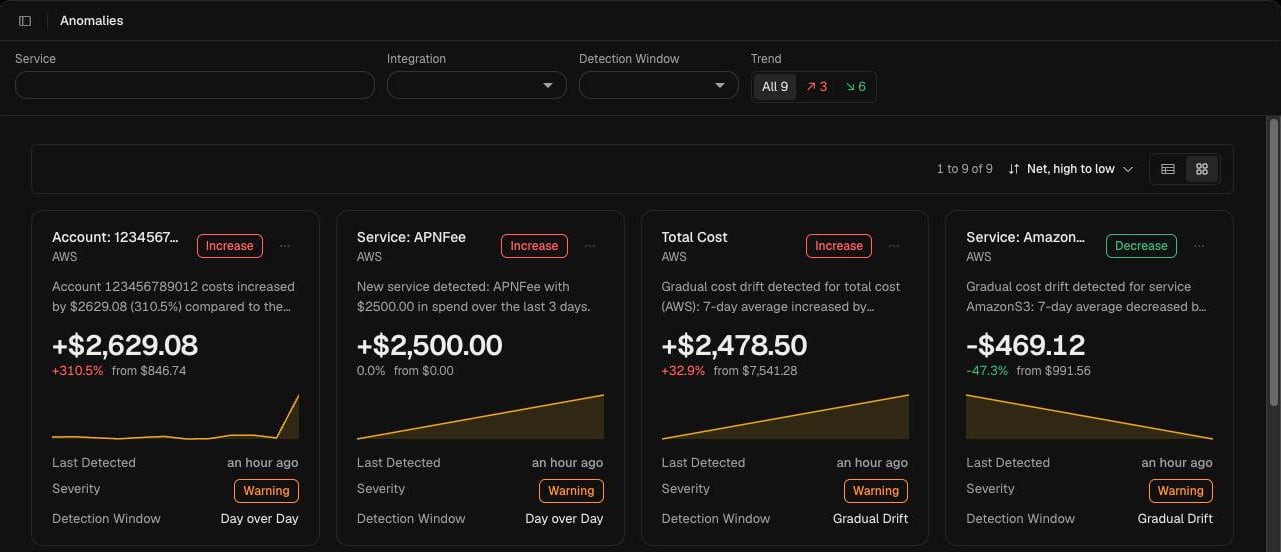
Anomalies page in card view, with account, service and total cost anomalies and the filters above

Detection windows

Filter and sort

  • Service: find anomalies for a service by name.
  • Integration: limit to one integration. Where you have several integrations from one provider, totals are named by integration.
  • Detection Window: show one window, or All.
  • Trend: show all anomalies, only increases, or only decreases. Each option shows how many anomalies it holds.
Sort by net change, and switch between card and table views.

Get notified

Connect Slack under Data > Integrations to send anomaly notifications to a Slack channel.

Investigate an anomaly

Open Analytics filtered to the same integration and service to see the spend behind it, or select Atlas AI and ask why the cost changed.