

Before you start
- An OPTIMAZE organisation where you are an Admin (only Admins can add integrations).
- Admin access to at least one billing source: AWS, Google Cloud, Azure, or an AI provider (OpenAI, Anthropic, Cursor).
- Optional: a business figure you already track, such as monthly revenue or active customers, to use as the denominator for unit economics.
Set up OPTIMAZE
1
Connect a billing source
In the sidebar, under Data, select Integrations, then choose a provider and follow its setup guide: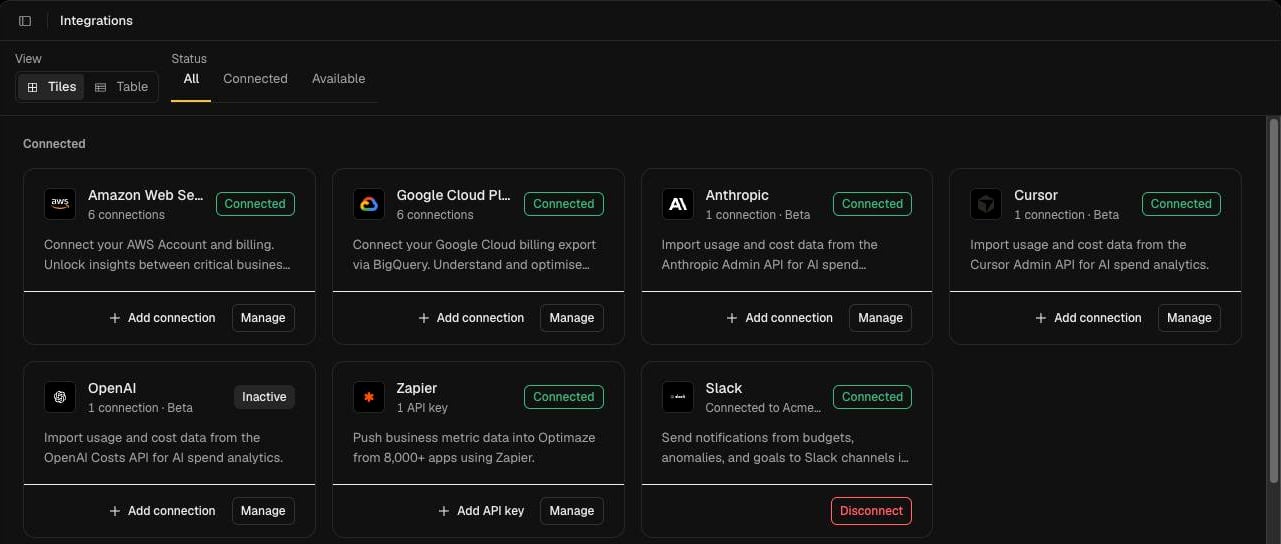
- Cloud: AWS, Google Cloud, Microsoft Azure
- AI providers: OpenAI, Anthropic, Cursor
2
Wait for the first sync
Cost data appears after the first successful sync. Check progress from the provider’s Manage view on the Integrations page.
3
Build your Financial Operating Model
Open Attribution and choose Financial Operating Model from the Attribution Models menu. Until you build it out, all spend sits in a single Unattributed node under the root. Select the edit icon, then either describe your structure to Atlas AI or build it in the Manual Editor. Select Publish when the model looks right.See Attribution and Edit and publish a model.
4
Add a business metric
Under Data, select Metrics, then New metric. Pick a template such as Monthly Revenue or Monthly Active Users, and upload values or send them through the API.See Business metrics.
5
Create a unit economic
Under Measure, select Unit Economics, then New unit economic. Choose the cost (a node on your model) and what to divide it by (your metric).See Unit economics.
Check it worked
Open Overview. You should see daily, monthly and yearly spend, the last quarter compared with the one before, and the unit economics, budgets and goals you own.Next steps
Atlas
Ask why costs changed or which budgets are at risk.
Anomalies
See unexpected changes in spend as they are detected.