

The Metrics page
Under Data, select Metrics. Each metric shows its Type, Details (unit, update frequency and how it arrives), a Trend, the Latest value, the change vs previous, its Status (Live or No data) and when it last received data. Use the row menu to Edit metric.Create a metric
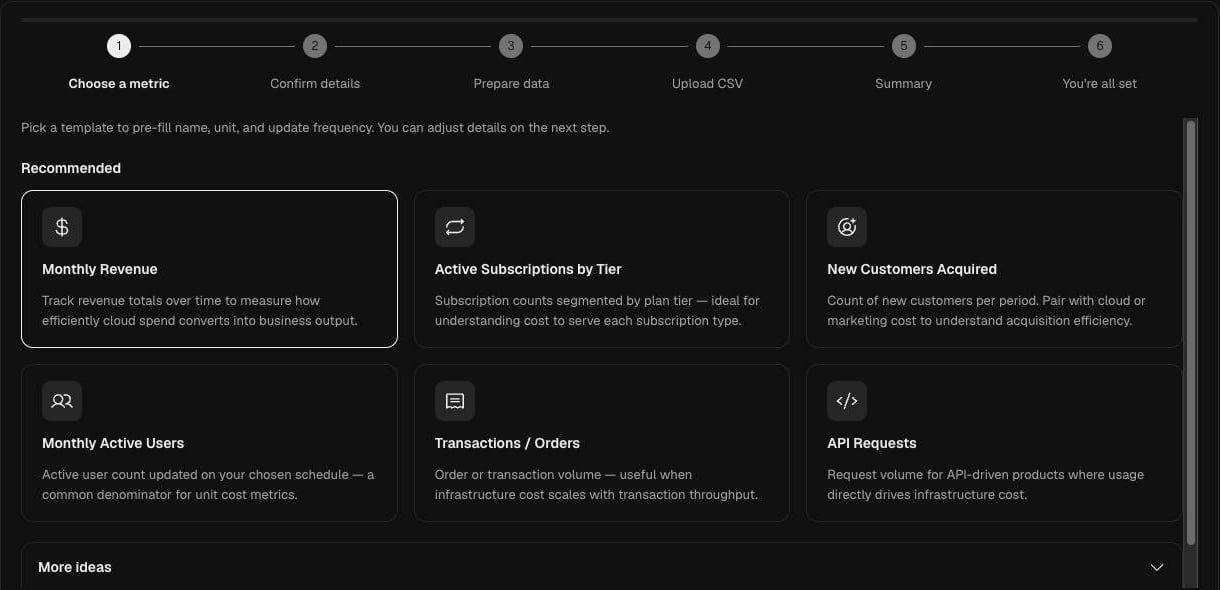
Select New metric. The wizard has six steps.1
Choose a metric
Pick a template to pre-fill the name, unit and update frequency: Monthly Revenue, Active Subscriptions by Tier, New Customers Acquired, Monthly Active Users, Transactions / Orders or API Requests. More ideas lists further templates.For full control over type and unit, select Advanced: Custom Metric Setup instead.
2
Confirm details
Check the Metric name (OPTIMAZE saves it in lowercase with underscores, for example
monthly_revenue), What this measures, the Update frequency and the Owner email. Select Create metric.3
Prepare data, Upload CSV and Summary
Prepare a CSV of historical values, upload it, and check the summary of what was imported.
4
You're all set
The metric appears on the Metrics page and is ready to use in a unit economic.
Send values through the API
To keep a metric current from your own systems, post datapoints to the Business Metrics API with an API key that has themetrics:ingest scope.
Endpoint: POST https://api.optimazehq.com/v1/metrics/ingest
A valid request returns
202 Accepted with no body. The full contract is in the API reference.
Send values from Zapier
The Zapier integration pushes business metric data into OPTIMAZE from other apps. Under Data > Integrations, select Add API key on the Zapier tile to create the key Zapier uses.Troubleshooting
- 401 or 403 from the API. The key is revoked, lacks
metrics:ingest, or does not match theoptimaze-org-idyou sent. - 400 validation error. Check the
metric_idexists,event_timeis valid RFC 3339, anddatais not empty. - Metric not found. The API does not create metrics, create it on the Metrics page first.
- Status shows No data. Values have not arrived yet, or their timestamps fall outside the date range you are viewing.